How Spamming Can Affect Your Blog & Website Rank?
BY: Myopic jain
Comments on a blog is the easiest way to share opinion, ask queries and engage readers in discussion.
But nowadays commenting is done with an intention to get backlinks to website for improving visibility in search engine.
And this has happened mainly due to an assumption that having a backlink from those sites which is reputable and related to your industry will enhance the reputation of your website in Google’s eyes.
Therefore, every blog has to deal with comment spam, which not only degrade its quality, but also one among the 50 common reasons that allow Google to penalize your web rank.
One should must know about the following-
- Harmful spammer’s activities
- How spamming affects your web rank?
- How you can identify spam comment?
- Preventive measures you must use
Harmful Spammer’s Activities
When spammers leave a comment it is tough to identify whether that comment is spam or genuine.
Spammers try to target some poorly secured commenting system in order to get more and more backlinks.
They create an automated spam robot that crawls over the web looking for an open comments. Once they find it, they hook in and start leaving comments over the hundreds and millions of websites about whatever they are dishing out, usually drugs, medicines, male enhancements, vitamins, gambling, porn etc.
Moreover, they hit multiple posts throughout your site with the same comment.
And to control these spamming, you can take following measures-
- Not allowing anonymous posting.
- Use captcha field to prevent automated comment spamming.
- Always turn on comment moderation.
- Block comment pages using robots.txt or meta tags.
- Use “nofollow” attribute for the links in the comment field.
Still after taking above measure, you get spam comments on your post then make sure you follow the points listed under preventive measures.
How It Hurt Your Web Rank
As you already know spammy email includes a lot of irrelevant content, nonsense keywords, phrases, non standard punctuation, formatting, etc and also various low quality spammy site links.
Also, spammers use many common spam words as an email subject line or in an email content that you usually come across.

So once these content is associated with your site, then as per the Google’s algorithm, it makes your site looks wary.
Now, Google will trust your site less and the result will be, lower ranking in search engine.
Additionally, as per the Google guidelines said by Matt Cutts, duplicate content won’t hurt you unless it is spammy.
How To Identify Spam Comment
Before moving ahead, I would like to define two interrelated terms that you will see in the comment section of your WordPress blog.
Pingbacks: Pingbacks are automatically created comment received when someone links to your blog posts or pages from one of their blog posts.
Remember, Pingbacks offer no value in terms of search engine, so just delete them.
Trackbacks: In Trackbacks, you are manually notified by one who linked to your blog post within theirs. To automate this process, Pingbacks are used.
Unfortunately, pingbacks and trackbacks can all be used as spam.

So here are some points that you need to look at your comments and determine whether you should approve it or not.
Commentator’s Link: This field may affect your website SEO badly if it contains the links of some irrelevant or low quality websites. So it is important to check the link or strip it before approving the comment on your blog post.
Duplicacy In Comment Content: It is important to check whether comment is specific to your post or not. It happens many times that the same content is already posted on dozens of blogs, so now it’s come through your blog, so disapprove such spammy comments.
Commentator’s Deliver Multiple Comments: Commentator’s follow many tricks and trials to promote their website or blogs. Using different email and website addresses, these SEO spammers have commented multiple times just to promote their phishing sites. So it is better to remove such comments.
Email Address Validity: Real audience does not provide meaningless or confusing email id’s but spammers uses, so it is better to verify an email address and check the real identity of a commentator.
Commentator’s Name: In order to game the search engine, spammers fill specific keywords associated with their web url in this field, but the real audience always provides a valid username. So it is necessary to check the name with respect to email address or the website url.
Let’s check out some examples of spammy comment-
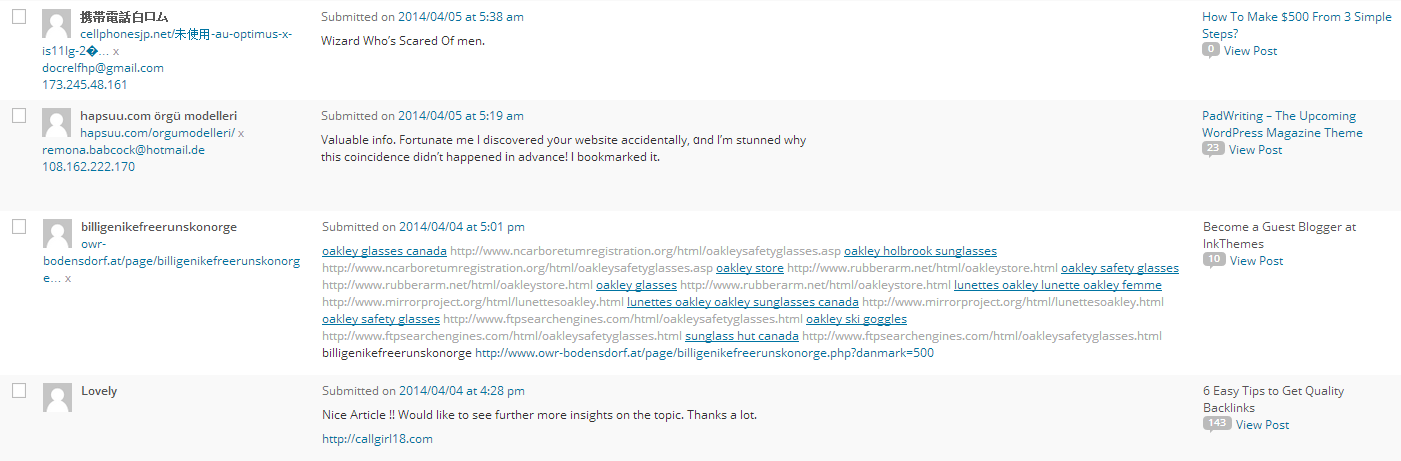
The above image easily clears the sign of spam comments which contain irrelevant text in all the fields which is not at all acceptable for a blog.
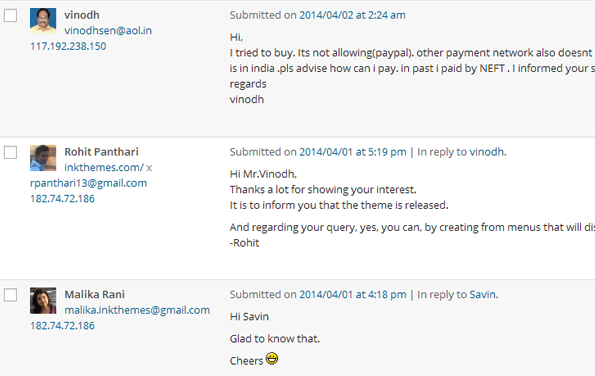
Where as an authentic comments contains valid text in all the fields like proper names, email ids, authentic web url, proper message, a perfect Gravatar image and it will look like this-
Preventive Measures You Must Use
It is very important to keep your eye always open against these spamming.
As per the Securelist recent report, the proportion of spam in February’s 2014 email traffic is averaged up to 69.9%.

Of course it is hard to stop the spam totally, but you can increase your protection level to prevent it.
Let’s look at some anti-spam WordPress plugins that helps to reduce spam comments or make it easier to spot it.
This plugin is super simple, no set up required, just activate it and block spam comment on your website.
2. Anti Spam
This plugin blocks spam in comments automatically, invisibly for users and for admin.
This plugin eliminates automated blog comment spam from bots, including trackback and pingback spam.
This plugins fires automated spambot, add a client side generated checkbox to the comment form so that checkbox has been checked before the comment is submitted.
5. NoSpamNX
This plugin also defeats with automated spambots, adds invisible form fields to the comment form. If a spambot fills these fields blindly, then the comment will not be saved.
This plugin asks a visitor simple math question in order to make the comment, just to detect visitor is human or a spam robot.
It automatically place the IP address of an administrator marked spammy comment on the WordPress comments blacklist.
8. Akismet
The Akismet web service offers an Akismet plugin that helps to filter out the spammy and non spammy comments.
This plugin stops spam registration, logins and comments using multiple checks.

Additionally, you can also download some anti-spam softwares for filtering your email to reduce the spam that reaches your inbox.
2. Spamihilator
Using the above prevention tools, I’m sure you will definitely prevent 9 out of 10 spam comments.
Of course, the listed measures to prevent spamming is limited here.
So if you want to add up some more or suggest any other means, it is appreciated and welcomed.

Moreover, let me know your thoughts about the post and how much it is helpful to you, just share it in the comment section.

0 comments:
Post a Comment